AWS - Configuration Guide
Purpose
This configuration guide describes how to install AWS components in the context of KaaS. AWS is used for:
- Storing the platform-pipeline, teams-provisioning-pipeline, stream governance pipeline, application-pipeline terraform statefile (remote state storage)
- Storing secrets needed by the application pipeline(s)
- Provisioning and running docker-containers for connectivity from pipelines to Confluent Cloud
- Transit Gateway and network configuration related to connectivity between Confluent Cloud and CORP (AWS-NET-Confluent-PRD)
AWS Account setup
The KaaS AWS subscriptions are initiated with an IT service request, via the "Public Cloud - Request new AWS Account" form. See C&CI Process Description and RITM0468303 as an example.
Access is automatically onboarded to novoAccess and can be requested through there. (e.g. "Cloud Group : AWS-NN-KaaS-PRD_Contributor")
AWS Account Overview:
- AWS-NN-KaaS-PRD | #941447692616 | requested with RITM0468303 (all configuration is stored here)
- AWS-NET-Confluent-PRD - See Connectivity for more details
- AWS-NN-KaaS-DEV | #021221665849 | requested with RITM0464152
- AWS-NN-KaaS-VAL | #898692020956 | requested with RITM0468302
AWS IAM Service Enablement
Azure DevOps needs to be configured as an identity provider on our AWS account in the IAM Console.
This is done by following the steps in the DevX Service Catalogue guide: Set up the AWS Account
Service Accounts (Team AWS IAM Role)
In order to make the team-specific application pipeline able to work with the terraform states in AWS, a service account/'AWS IAM Role' needs to be created centrally (see Team Onboarding) with the following name kaas-prod-ns--deploy (insert relevant teamname/namespace and replace prod with preprod, if onboarding to preprod) and below policies;
Trust policy
Note: manually replace all occurrences of {{TEAM_NAME}} in the below policy with the name of the team/namespace
Note: manually replace all occurrences of {{PROJECT_NAME}} in the below policy with the name of the Azure DevOps project of the team
First, create IAM role with below policy
 1
 2
 3
 4
 5
 6
 7
 8
 9
10
11
12
13
14
15
16
17
18 | {
"Version": "2012-10-17",
"Statement": [
{
"Effect": "Allow",
"Principal": {
"Federated": "arn:aws:iam::941447692616:oidc-provider/vstoken.dev.azure.com/59f105ea-4241-452b-a204-2c5ff4c34582"
},
"Action": "sts:AssumeRoleWithWebIdentity",
"Condition": {
"StringEquals": {
"vstoken.dev.azure.com/59f105ea-4241-452b-a204-2c5ff4c34582:aud": "api://AzureADTokenExchange",
"vstoken.dev.azure.com/59f105ea-4241-452b-a204-2c5ff4c34582:sub": "sc://novonordiskit/{{PROJECT_NAME}}/kaas-prod-ns-{{TEAM_NAME}}-deploy"
}
}
}
]
}
|
Permissions policy
Note: manually replace all occurrences of {{TEAM_NAME}} in the below policy with the name of the team/namespace
Note: s3 resource names need to be converted from to underscore (_) to hyphen (-) if the namespace contains it (no underscore support. Also being replaced in kaas-pipeline-templates: terragrunt.hcl)
 1
 2
 3
 4
 5
 6
 7
 8
 9
10
11
12
13
14
15
16
17
18
19
20
21
22
23
24
25
26
27
28
29
30
31
32
33
34
35
36
37
38
39
40
41
42
43
44
45
46
47
48
49
50
51
52
53
54
55
56
57
58
59
60
61
62
63
64
65
66
67
68
69
70
71
72
73
74
75
76
77
78
79
80
81
82
83
84
85
86
87 | {
"Version": "2012-10-17",
"Statement": [
{
"Sid": "SecretsManager",
"Action": [
"secretsmanager:GetSecretValue",
"secretsmanager:DescribeSecret",
"secretsmanager:GetResourcePolicy"
],
"Resource": [
"arn:aws:secretsmanager:eu-central-1:941447692616:secret:confluent_cloud_*_{{TEAM_NAME}}*",
"arn:aws:secretsmanager:eu-central-1:941447692616:secret:confluent_cloud_platform_pipeline_secret_*"
],
"Effect": "Allow"
},
{
"Sid": "TerraformRemoteState",
"Effect": "Allow",
"Action": [
"dynamodb:GetItem",
"dynamodb:PutItem",
"dynamodb:DeleteItem",
"dynamodb:DescribeTable",
"s3:ListBucket",
"s3:ListAllMyBuckets",
"s3:GetBucketVersioning",
"s3:GetBucketPolicy",
"s3:GetBucketAcl",
"s3:GetBucketLogging",
"s3:GetEncryptionConfiguration",
"s3:GetBucketPublicAccessBlock",
"s3:GetObject",
"s3:PutObject",
"s3:DeleteObject"
],
"Resource": [
"arn:aws:s3:::kaas-tfstate-prod-ns-{{TEAM_NAME}}",
"arn:aws:s3:::kaas-tfstate-prod-ns-{{TEAM_NAME}}/*",
"arn:aws:dynamodb:*:*:table/kaas-tfstate-prod-ns-{{TEAM_NAME}}"
]
},
{
"Sid": "AllowGetAccount",
"Effect": "Allow",
"Action": [
"sts:GetCallerIdentity"
],
"Resource": [
"*"
]
},
{
"Sid": "AllowInvokeAPIGateway",
"Effect": "Allow",
"Action": "execute-api:Invoke",
"Resource": "arn:aws:execute-api:eu-central-1:941447692616:j4mqdl0gqf/prod/POST/run-task"
},
{
"Sid": "KMSKeysDirectAccess",
"Effect": "Allow",
"Action": [
"kms:Decrypt",
"kms:DescribeKey",
"kms:Encrypt",
"kms:GenerateDataKey"
],
"Resource": [
"arn:aws:kms:eu-central-1:941447692616:key/a4d9e9de-16c2-441b-98f0-375c7c4c0d9b",
"arn:aws:kms:eu-central-1:941447692616:key/d7fc27fd-f1c1-45a7-81a4-5a1764df14a0"
]
},
{
"Sid": "SSMParameterStore",
"Effect": "Allow",
"Action": [
"ssm:GetParameter",
"ssm:GetParameters",
"ssm:GetParametersByPath",
"ssm:DescribeParameters"
],
"Resource": [
"arn:aws:ssm:eu-central-1:941447692616:parameter/confluent_infra/*"
]
}
]
}
|
Policy & Roles
There will be an IAM role per team/namespace in the AWS account, to ensure isolation between the accesses.
Prerequisite: You must have Cloud Group : AWS-NN-KaaS-PRD_Contributor with an admin account.
Editing Policies
Go to AWS (https://novonordisk-main.awsapps.com/start#/) and select "AWS-NN-KaaS-PRD"
Go to IAM → Policies → Edit Policy
Preprod
For Preprod testing and exploration, replace all occurrences of 941447692616 (PROD aws account ID) with 898692020956 (VAL/PREPROD AWS account ID) in the policies, and remove all occurrences of "prod" in the policy with "preprod".
Additionally, the AllowInvokeAPIGateway API ID would need to be changed from j4mqdl0gqf to izl4c4uty5.
API Keys and Authentication
⚠️ DEPRECATED: IAM User approach is being phased out
The platform-pipeline and teams-pipeline uses the iamuser "CloudDevOpsUser". Teams will be having IAMusers with the same name as the policy ("kaas--deploy-iamuser").
✅ CURRENT APPROACH: AWS Service Connections with OIDC
As of July 2025, KaaS platform has migrated to using AWS Service Connections with OIDC authentication instead of static IAM User credentials. This provides enhanced security through temporary credentials and eliminates the need for managing static API keys.
Platform pipelines (replacing CloudDevOpsUser):
- Preprod: kaas-preprod-platform-admin
- Prod: kaas-prod-platform-admin
Team pipelines:
- Pattern: kaas-{confluentOrganization}-ns-{namespace}-deploy
- Examples: kaas-preprod-ns-teamname-deploy, kaas-prod-ns-teamname-deploy
OIDC Authentication: Temporary credentials are generated for each pipeline run via trust relationships
For detailed setup instructions, see: AWS OIDC Service Connection Guide
Legacy IAM User Information (for reference only):
Go to IAM → Users → select relevant user → security credentials, under access key → Create Access Key (maximum of 2). This access key and secret must be shared with the projects, who will need to create a variable group in their ADO library and paste them there, so they can be used by their pipelines.
More details on API key usage and rotation can be found here. API Key Rotation
✅ CURRENT: This policy is now attached to IAM Roles used by AWS Service Connections, providing temporary access via OIDC trust relationships.
⚠️ LEGACY: The platform AWS user is named CloudDevOpsUser and its policy is named DevOpsUserPolicy
Current Implementation:
Platform Roles (replacing CloudDevOpsUser):
- Preprod: Role kaas-preprod-platform-admin-role → Service Connection kaas-preprod-platform-admin
- Prod: Role kaas-prod-platform-admin-role → Service Connection kaas-prod-platform-admin
Team Roles:
- Pattern: Role kaas-{confluentOrganization}-ns-{namespace}-deploy-role → Service Connection kaas-{confluentOrganization}-ns-{namespace}-deploy
- Examples:
- kaas-preprod-ns-teamname-deploy-role → kaas-preprod-ns-teamname-deploy
- kaas-prod-ns-teamname-deploy-role → kaas-prod-ns-teamname-deploy
SnykUserRole
- Role name: SnykUserRole (attach the policy
SnykUserRolePolicy)
- Purpose: Allow Snyk to pull images and read repository metadata from ECR repositories in eu-central-1.
AWS Policies in Use:
The following AWS policies are still actively used, now attached to IAM roles instead of IAM users:
- DevOpsUserPolicy - Main platform permissions policy
- DevOpsUserPolicyExtension - Main platform permissions extension policy (as DevOpsUserPolicy would exceed 6144 characters limit)
- KMSDevOpsUserPolicy - KMS encryption/decryption permissions
- SnykUserRolePolicy - Allow Snyk with read‑only permissions to pull images and retrieve repository metadata from all ECR repositories in the eu-central-1 region.
These policies provide the same permissions as before, but are now consumed through OIDC trust relationships rather than static API keys.
Mandatory Permissions Boundary on Role Creation
To prevent privilege escalation, the platform now enforces a permissions-boundary requirement whenever platform roles are created or deleted. The platform policy includes the following condition on role creation/deletion:
 1
 2
 3
 4
 5
 6
 7
 8
 9
10
11
12
13
14 | {
"Sid": "CreateDeleteRole",
"Action": [
"iam:CreateRole",
"iam:DeleteRole"
],
"Resource": "arn:aws:iam::941447692616:role/kaas*",
"Effect": "Allow",
"Condition": {
"StringEquals": {
"iam:PermissionsBoundary": "arn:aws:iam::941447692616:policy/PermissionsBoundaryPlatform"
}
}
}
|
Implications:
- Every IAM role created by our Terraform pipelines must attach the boundary: arn:aws:iam::941447692616:policy/PermissionsBoundaryPlatform.
- In Terraform, set the role’s permissions boundary, for example:
| resource "aws_iam_role" "example" {
# ...
permissions_boundary = "arn:aws:iam::941447692616:policy/PermissionsBoundaryPlatform"
}
|
What the permissions boundary does:
- Effective permissions are the intersection of the role’s identity-based policies and the permissions boundary. The boundary never grants more than the role; it can only further restrict.
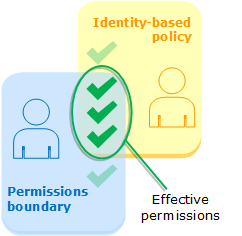
About the PermissionsBoundaryPlatform policy:
- It was produced by merging all our current platform policies.
- To stay within the AWS managed policy size limit (6144 characters), we kept explicit actions for critical services (VPC/EC2 networking, ECS, IAM) and used action wildcards (*) for less critical services where appropriate, deduplicating statements to reduce size.
DevOpsUserPolicy :
1
2
3
4
5
6
7
8
9
10
11
12
13
14
15
16
17
18
19
20
21
22
23
24
25
26
27
28
29
30
31
32
33
34
35
36
37
38
39
40
41
42
43
44
45
46
47
48
49
50
51
52
53
54
55
56
57
58
59
60
61
62
63
64
65
66
67
68
69
70
71
72
73
74
75
76
77
78
79
80
81
82
83
84
85
86
87
88
89
90
91
92
93
94
95
96
97
98
99
100
101
102
103
104
105
106
107
108
109
110
111
112
113
114
115
116
117
118
119
120
121
122
123
124
125
126
127
128
129
130
131
132
133
134
135
136
137
138
139
140
141
142
143
144
145
146
147
148
149
150
151
152
153
154
155
156
157
158
159
160
161
162
163
164
165
166
167
168
169
170
171
172
173
174
175
176
177
178
179
180
181
182
183
184
185
186
187
188
189
190
191
192
193
194
195
196
197
198
199
200
201
202
203
204
205
206
207
208
209
210
211
212
213
214
215
216
217
218
219
220
221
222
223
224
225
226
227
228
229
230
231
232
233
234
235
236
237
238
239
240
241
242
243
244
245
246
247
248
249
250
251
252
253
254
255
256
257
258
259
260
261
262
263
264
265
266
267
268
269
270
271
272
273
274
275
276
277
278
279
280
281
282
283
284
285
286
287
288
289
290
291
292
293
294
295
296
297
298
299
300
301
302
303
304
305 | {
"Version": "2012-10-17",
"Statement": [
{
"Sid": "GetandListPolicies",
"Action": [
"iam:GetRole",
"iam:ListRolePolicies",
"iam:ListAttachedRolePolicies",
"iam:GetRolePolicy",
"iam:GetPolicy",
"iam:GetPolicyVersion",
"iam:ListPolicyVersions",
"iam:ListInstanceProfilesForRole",
"iam:PutRolePermissionsBoundary",
"iam:DeleteRolePermissionsBoundary"
],
"Resource": "*",
"Effect": "Allow"
},
{
"Sid": "AssumeOrPassRole",
"Action": [
"iam:PassRole",
"sts:AssumeRole"
],
"Resource": "arn:aws:iam::941447692616:role/kaas*",
"Effect": "Allow",
"Condition": {
"StringEquals": {
"iam:PassedToService": [
"ecs.amazonaws.com",
"ecs-tasks.amazonaws.com",
"fargate.amazonaws.com",
"ecr.amazonaws.com"
]
}
}
},
{
    "Sid": "CreateDeleteRole",
    "Action": [
        "iam:CreateRole",
        "iam:DeleteRole"
    ],
    "Resource": "arn:aws:iam::941447692616:role/kaas*",
    "Effect": "Allow",
    "Condition": {
        "StringEquals": {
            "iam:PermissionsBoundary": "arn:aws:iam::941447692616:policy/PermissionsBoundaryPlatform"
        }
    }
},
{
"Sid": "StandAloneRolePolicy",
"Action": [
"iam:AttachRolePolicy",
"iam:DetachRolePolicy"
],
"Resource": "arn:aws:iam::941447692616:role/kaas*",
"Effect": "Allow"
},
{
"Sid": "InlineRolePolicy",
"Action": [
"iam:PutRolePolicy",
"iam:DeleteRolePolicy"
],
"Resource": "arn:aws:iam::941447692616:role/kaas*",
"Effect": "Allow"
},
{
"Sid": "CreateDeletePolicy",
"Action": [
"iam:CreatePolicy",
"iam:DeletePolicy",
"iam:CreatePolicyVersion",
"iam:DeletePolicyVersion"
],
"Resource": "arn:aws:iam::941447692616:policy/kaas-*",
"Effect": "Allow"
},
{
"Sid": "TerraformStateDynamoDB",
"Action": [
"dynamodb:*"
],
"Resource": [
"arn:aws:dynamodb:eu-central-1:941447692616:table/confluent-cloud-*",
"arn:aws:dynamodb:eu-central-1:941447692616:table/kaas-*"
],
"Effect": "Allow"
},
{
"Sid": "TerraformStateS3",
"Action": [
"s3:*"
],
"Resource": [
"arn:aws:s3:::confluent-cloud-*",
"arn:aws:s3:::kaas-*"
],
"Effect": "Allow"
},
{
"Sid": "TerraformStateClean",
"Action": [
"s3:ListBucket",
"s3:ListAllMyBuckets"
],
"Resource": [
"*"
],
"Effect": "Allow"
},
{
"Sid": "SecretsManager",
"Action": [
"secretsmanager:CreateSecret",
"secretsmanager:DescribeSecret",
"secretsmanager:GetResourcePolicy",
"secretsmanager:DeleteSecret",
"secretsmanager:UpdateSecret",
"secretsmanager:PutSecretValue",
"secretsmanager:ListSecrets",
"secretsmanager:GetSecretValue",
"secretsmanager:UpdateSecretVersionStage"
],
"Resource": [
"arn:aws:secretsmanager:eu-central-1:941447692616:secret:confluent_cloud_*",
"arn:aws:secretsmanager:eu-central-1:941447692616:secret:kaas-*"
],
"Effect": "Allow"
},
{
"Sid": "KMSkey",
"Effect": "Allow",
"Action": [
"kms:CreateKey",
"kms:DescribeKey",
"kms:GetKeyPolicy",
"kms:GetKeyRotationStatus",
"kms:ListResourceTags",
"kms:ListKeyPolicies",
"kms:ListKeys",
"kms:ScheduleKeyDeletion",
"kms:PutKeyPolicy",
"kms:ListAliases",
"kms:CreateKey",
"kms:CreateAlias",
"kms:DeleteAlias",
"kms:UpdateKeyDescription"
],
"Resource": "*"
},
{
"Sid": "CloudWatch",
"Effect": "Allow",
"Action": "cloudwatch:*",
"Resource": "*"
},
{
"Sid": "LogGroupProvison",
"Effect": "Allow",
"Action": [
"logs:CreateLogGroup",
"logs:PutRetentionPolicy",
"logs:ListTagsLogGroup",
"logs:DeleteLogGroup"
],
"Resource": "arn:aws:logs:eu-central-1:941447692616:log-group:/kaas*:*"
},
{
"Sid": "LogGroupDescribe",
"Effect": "Allow",
"Action": [
"logs:DescribeLogGroups"
],
"Resource": "arn:aws:logs:eu-central-1:941447692616:log-group:*:*"
},
{
"Sid": "LogGroupListTags",
"Effect": "Allow",
"Action": [
"logs:ListTagsForResource"
],
"Resource": "arn:aws:logs:eu-central-1:941447692616:log-group:*"
},
{
"Sid": "AzurePipelineAgentEcsCluster",
"Effect": "Allow",
"Action": "ecs:*",
"Resource": "arn:aws:ecs:eu-central-1:941447692616:cluster/kaas-*"
},
{
"Sid": "AzurePipelineAgentEcsClusterCreate",
"Effect": "Allow",
"Action": "ecs:CreateCluster",
"Resource": "*"
},
{
"Sid": "AzurePipelineAgentEcsTaskDefinition",
"Effect": "Allow",
"Action": [
"ecs:RegisterTaskDefinition",
"ecs:DeregisterTaskDefinition",
"ecs:DescribeTaskDefinition"
],
"Resource": "*"
},
{
"Sid": "AzurePipelinAgentTaskDefinitionTag",
"Effect": "Allow",
"Action": [
"ecs:TagResource"
],
"Resource": "arn:aws:ecs:eu-central-1:941447692616:task-definition/kaas*:*"
},
{
"Sid": "AzurePipelineAgentEcsService",
"Effect": "Allow",
"Action": [
"ecs:CreateService",
"ecs:UpdateService",
"ecs:DeleteService",
"ecs:DescribeServices",
"ecs:ListServices",
"ecs:UpdateTaskProtection"
],
"Resource": "*"
},
{
"Sid": "AzurePipelineAgentEcsTasks",
"Effect": "Allow",
"Action": [
"ecs:RunTask",
"ecs:StartTask",
"ecs:StopTask",
"ecs:DescribeTasks",
"ecs:ListTasks"
],
"Resource": [
"arn:aws:ecs:eu-central-1:941447692616:task-definition/kaas*",
"arn:aws:ecs:eu-central-1:941447692616:cluster/kaas*"
]
},
{
"Sid": "AzurePipelineAgentEcr",
"Action": [
"ecr:*"
],
"Resource": "arn:aws:ecr:eu-central-1:941447692616:repository/kaas*",
"Effect": "Allow"
},
{
"Sid": "AzurePipelineAgentEcrGetAuthorizationTokenForDockerBuildAndPull",
"Action": [
"ecr:GetAuthorizationToken"
],
"Resource": "*",
"Effect": "Allow"
},
{
"Sid": "AWSParameterStore",
"Effect": "Allow",
"Action": [
"ssm:PutParameter",
"ssm:DeleteParameters",
"ssm:DeleteParameter",
"ssm:GetParameters",
"ssm:GetParameterHistory",
"ssm:GetParameter",
"ssm:GetParametersByPath",
"ssm:LabelParameterVersion",
"ssm:UnlabelParameterVersion",
"ssm:DescribeParameters",
"ssm:DescribeDocumentParameters",
"ssm:ListTagsForResource"
],
"Resource": [
"arn:aws:ssm:eu-central-1:941447692616:*"
]
},
{
"Sid": "AllowInvokeAPIGateway",
"Effect": "Allow",
"Action": "execute-api:Invoke",
"Resource": "arn:aws:execute-api:eu-central-1:941447692616:j4mqdl0gqf/prod/POST/run-task"
},
{
"Sid": "KMSInternalKeyDirectAccess",
"Effect": "Allow",
"Action": [
"kms:Decrypt",
"kms:DescribeKey",
"kms:Encrypt",
"kms:GenerateDataKey"
],
"Resource": [
"arn:aws:kms:eu-central-1:941447692616:key/a4d9e9de-16c2-441b-98f0-375c7c4c0d9b",
"arn:aws:kms:eu-central-1:941447692616:key/d7fc27fd-f1c1-45a7-81a4-5a1764df14a0"
]
}
]
}
|
DevOpsUserPolicyExtension
1
2
3
4
5
6
7
8
9
10
11
12
13
14
15
16
17
18
19
20
21
22
23
24
25
26
27
28
29
30
31
32
33
34
35
36
37
38
39
40
41
42
43
44
45
46
47
48
49
50
51
52
53
54
55
56
57
58
59
60
61
62
63
64
65
66
67
68
69
70
71
72
73
74
75
76
77
78
79
80
81
82
83
84
85
86
87
88
89
90
91
92
93
94
95
96
97 | {
"Version": "2012-10-17",
"Statement": [
{
"Sid": "EventBridgeBusAndRuleManageScoped",
"Effect": "Allow",
"Action": [
"events:CreateEventBus",
"events:DeleteEventBus",
"events:DescribeEventBus",
"events:ListTagsForResource",
"events:TagResource",
"events:UntagResource",
"events:ListEventBuses",
"events:ListRules",
"events:ListTargetsByRule",
"events:DescribeRule",
"events:PutRule",
"events:DeleteRule",
"events:PutTargets",
"events:RemoveTargets"
],
"Resource": [
"arn:aws:events:eu-central-1:941447692616:event-bus/default",
"arn:aws:events:eu-central-1:941447692616:rule/kaas-*"
]
},
{
"Sid": "IAMPassRoleForLambda",
"Effect": "Allow",
"Action": "iam:PassRole",
"Resource": "arn:aws:iam::941447692616:role/kaas-*",
"Condition": {
"StringEquals": {
"iam:PassedToService": "lambda.amazonaws.com"
}
}
},
{
"Sid": "CloudWatchLogsScopedManageLambdaGroup",
"Effect": "Allow",
"Action": "logs:*",
"Resource": [
"arn:aws:logs:eu-central-1:941447692616:log-group:/aws/lambda/kaas-*",
"arn:aws:logs:eu-central-1:941447692616:log-group:/aws/lambda/kaas-*:log-stream:*"
]
},
{
"Sid": "LambdaFunctionManageScoped",
"Effect": "Allow",
"Action": "lambda:*",
"Resource": "arn:aws:lambda:eu-central-1:941447692616:function:kaas-*"
},
{
"Sid": "AutoScalingAndCloudWatch",
"Effect": "Allow",
"Action": [
"application-autoscaling:RegisterScalableTarget",
"application-autoscaling:DeregisterScalableTarget",
"application-autoscaling:DescribeScalableTargets",
"application-autoscaling:PutScalingPolicy",
"application-autoscaling:DeleteScalingPolicy",
"application-autoscaling:DescribeScalingPolicies",
"application-autoscaling:DescribeScalingActivities",
"application-autoscaling:PutScheduledAction",
"application-autoscaling:DeleteScheduledAction",
"application-autoscaling:DescribeScheduledActions",
"application-autoscaling:ListTagsForResource",
"application-autoscaling:TagResource",
"application-autoscaling:UntagResource",
"logs:PutMetricFilter",
"logs:DeleteMetricFilter",
"logs:DescribeMetricFilters",
"cloudwatch:PutMetricData",
"cloudwatch:GetMetricStatistics",
"cloudwatch:ListMetrics",
"cloudwatch:PutMetricAlarm",
"cloudwatch:DeleteAlarms",
"cloudwatch:DescribeAlarms",
"cloudwatch:DescribeAlarmsForMetric",
"cloudwatch:ListTagsForResource",
"cloudwatch:TagResource",
"cloudwatch:UntagResource",
"iam:CreateServiceLinkedRole"
],
"Resource": [
"arn:aws:application-autoscaling:eu-central-1:941447692616:scalable-target:service/ecs/kaas-*/kaas-*",
"arn:aws:application-autoscaling:eu-central-1:941447692616:scaling-policy:service/ecs/kaas-*/kaas-*",
"arn:aws:application-autoscaling:eu-central-1:941447692616:scheduled-action:service/ecs/kaas-*/kaas-*",
"arn:aws:cloudwatch:eu-central-1:941447692616:alarm:kaas-*",
"arn:aws:logs:eu-central-1:941447692616:log-group:/kaas-*",
"arn:aws:logs:eu-central-1:941447692616:log-group:/kaas-*:log-stream:*",
"arn:aws:iam::941447692616:role/aws-service-role/ecs.application-autoscaling.amazonaws.com/*"
]
}
]
}
|
KMSDevOpsUserPolicy
1
2
3
4
5
6
7
8
9
10
11
12
13
14
15
16
17
18
19
20
21
22
23
24
25
26
27
28
29
30
31
32
33
34
35
36
37
38
39
40
41
42
43
44
45
46
47
48 | {
"Version": "2012-10-17",
"Statement": [
{
"Sid": "KMSkey",
"Effect": "Allow",
"Action": [
"kms:TagResource",
"kms:EnableKeyRotation"
],
"Resource": "*"
},
{
"Sid": "KMSS3ServiceUsage",
"Effect": "Allow",
"Action": [
"kms:Decrypt",
"kms:Encrypt",
"kms:GenerateDataKey"
],
"Resource": [
"arn:aws:kms:eu-central-1:941447692616:key/a4d9e9de-16c2-441b-98f0-375c7c4c0d9b",
"arn:aws:kms:eu-central-1:941447692616:key/d7fc27fd-f1c1-45a7-81a4-5a1764df14a0"
],
"Condition": {
"StringEquals": {
"kms:ViaService": [
"s3.eu-central-1.amazonaws.com"
]
}
}
},
{
"Sid": "KMSKeysDirectAccess",
"Effect": "Allow",
"Action": [
"kms:Decrypt",
"kms:DescribeKey",
"kms:Encrypt",
"kms:GenerateDataKey"
],
"Resource": [
"arn:aws:kms:eu-central-1:941447692616:key/a4d9e9de-16c2-441b-98f0-375c7c4c0d9b",
"arn:aws:kms:eu-central-1:941447692616:key/d7fc27fd-f1c1-45a7-81a4-5a1764df14a0"
]
}
]
}
|
SnykUserRolePolicy
1
2
3
4
5
6
7
8
9
10
11
12
13
14
15
16
17
18
19
20
21
22
23
24
25 | {
"Version": "2012-10-17",
"Statement": [
{
"Sid": "SnykAllowPull",
"Effect": "Allow",
"Action": [
"ecr:GetLifecyclePolicyPreview",
"ecr:GetDownloadUrlForLayer",
"ecr:BatchGetImage",
"ecr:DescribeImages",
"ecr:GetAuthorizationToken",
"ecr:DescribeRepositories",
"ecr:ListTagsForResource",
"ecr:ListImages",
"ecr:BatchCheckLayerAvailability",
"ecr:GetRepositoryPolicy",
"ecr:GetLifecyclePolicy"
],
"Resource": [
"*"
]
}
]
}
|
PermissionsBoundaryPlatform
 1
 2
 3
 4
 5
 6
 7
 8
 9
10
11
12
13
14
15
16
17
18
19
20
21
22
23
24
25
26
27
28
29
30
31
32
33
34
35
36
37
38
39
40
41
42
43
44
45
46
47
48
49
50
51
52
53
54
55
56
57
58
59
60
61
62
63
64
65
66
67
68
69
70
71
72
73
74
75
76
77
78
79
80
81
82
83
84
85
86
87
88
89
90
91
92
93
94
95
96
97
98
99
100
101
102
103
104
105
106
107
108
109
110
111
112
113
114
115
116
117
118
119
120
121
122
123
124
125
126
127
128
129
130
131
132
133
134
135
136
137
138
139
140
141
142
143
144
145
146
147
148
149
150
151
152
153
154
155
156
157
158
159
160
161
162
163
164
165
166
167
168
169
170
171
172
173
174
175
176
177
178
179
180
181
182
183
184
185
186
187
188
189
190
191
192
193
194
195
196
197
198
199
200
201
202
203
204
205
206
207
208
209
210
211
212
213
214
215
216
217
218
219
220
221 | {
"Version": "2012-10-17",
"Statement": [
{
"Sid": "AssumeOrPassRole",
"Action": [
"iam:PassRole",
"sts:AssumeRole"
],
"Effect": "Allow",
"Condition": {
"StringEquals": {
"iam:PassedToService": [
"ecs.amazonaws.com",
"ecs-tasks.amazonaws.com",
"fargate.amazonaws.com",
"ecr.amazonaws.com"
]
}
},
"Resource": "arn:aws:iam::941447692616:role/kaas*"
},
{
"Sid": "TerraformStateDynamoDB",
"Action": "dynamodb:*",
"Effect": "Allow",
"Resource": [
"arn:aws:dynamodb:eu-central-1:941447692616:table/confluent-cloud-*",
"arn:aws:dynamodb:eu-central-1:941447692616:table/kaas-*"
]
},
{
"Sid": "TerraformStateS3",
"Action": "s3:*",
"Effect": "Allow",
"Resource": [
"arn:aws:s3:::confluent-cloud-*",
"arn:aws:s3:::kaas-*"
]
},
{
"Sid": "TerraformStateClean",
"Action": "s3:*",
"Effect": "Allow",
"Resource": "*"
},
{
"Sid": "SecretsManager",
"Action": "secretsmanager:*",
"Effect": "Allow",
"Resource": [
"arn:aws:secretsmanager:eu-central-1:941447692616:secret:confluent_cloud_*",
"arn:aws:secretsmanager:eu-central-1:941447692616:secret:kaas-*"
]
},
{
"Sid": "KMSkey",
"Effect": "Allow",
"Action": "kms:*",
"Resource": "*"
},
{
"Sid": "CloudWatch",
"Effect": "Allow",
"Action": "cloudwatch:*",
"Resource": "*"
},
{
"Sid": "LogGroupProvison",
"Effect": "Allow",
"Action": "logs:*",
"Resource": [
"arn:aws:logs:*:*:log-group:*"
]
},
{
"Sid": "AzurePipelineAgentEcr",
"Action": "ecr:*",
"Effect": "Allow",
"Resource": [
"arn:aws:ecr:*:*:repository/kaas*"
]
},
{
"Sid": "AzurePipelineAgentEcrGetAuthorizationTokenForDockerBuildAndPull",
"Action": "ecr:*",
"Effect": "Allow",
"Resource": "*"
},
{
"Sid": "AWSParameterStore",
"Effect": "Allow",
"Action": "ssm:*",
"Resource": "arn:aws:ssm:eu-central-1:941447692616:*"
},
{
"Sid": "AllowInvokeAPIGateway",
"Effect": "Allow",
"Action": "execute-api:*",
"Resource": "arn:aws:execute-api:eu-central-1:941447692616:j4mqdl0gqf/prod/POST/run-task"
},
{
"Sid": "KMSInternalKeyDirectAccess",
"Effect": "Allow",
"Action": "kms:*",
"Resource": [
"arn:aws:kms:eu-central-1:941447692616:key/a4d9e9de-16c2-441b-98f0-375c7c4c0d9b",
"arn:aws:kms:eu-central-1:941447692616:key/d7fc27fd-f1c1-45a7-81a4-5a1764df14a0"
]
},
{
"Sid": "EventBridgeBusAndRuleManageScoped",
"Effect": "Allow",
"Action": "events:*",
"Resource": [
"arn:aws:events:eu-central-1:941447692616:event-bus/default",
"arn:aws:events:eu-central-1:941447692616:rule/kaas-*"
]
},
{
"Sid": "LambdaFunctionManageScoped",
"Effect": "Allow",
"Action": "lambda:*",
"Resource": "arn:aws:lambda:eu-central-1:941447692616:function:kaas-*-inspector-teams"
},
{
"Sid": "KMSS3ServiceUsage",
"Effect": "Allow",
"Action": "kms:*",
"Condition": {
"StringEquals": {
"kms:ViaService": [
"s3.eu-central-1.amazonaws.com"
]
}
},
"Resource": [
"arn:aws:kms:eu-central-1:941447692616:key/a4d9e9de-16c2-441b-98f0-375c7c4c0d9b",
"arn:aws:kms:eu-central-1:941447692616:key/d7fc27fd-f1c1-45a7-81a4-5a1764df14a0"
]
},
{
"Sid": "IAMCombined",
"Effect": "Allow",
"Action": [
"iam:GetPolicy",
"iam:GetPolicyVersion",
"iam:GetRole",
"iam:GetRolePolicy",
"iam:ListAttachedRolePolicies",
"iam:ListInstanceProfilesForRole",
"iam:ListPolicyVersions",
"iam:ListRolePolicies",
"iam:AttachRolePolicy",
"iam:CreateRole",
"iam:DeleteRole",
"iam:DeleteRolePolicy",
"iam:DetachRolePolicy",
"iam:PutRolePolicy",
"iam:CreatePolicy",
"iam:CreatePolicyVersion",
"iam:DeletePolicy",
"iam:DeletePolicyVersion"
],
"Resource": "*"
},
{
"Sid": "ECSCombined",
"Effect": "Allow",
"Action": "ecs:*",
"Resource": [
"arn:aws:ecs:eu-central-1:941447692616:cluster/kaas-*",
"arn:aws:ecs:eu-central-1:941447692616:task-definition/kaas*"
]
},
{
"Sid": "ECSCombined2",
"Effect": "Allow",
"Action": [
"ecs:CreateCluster",
"ecs:DeregisterTaskDefinition",
"ecs:DescribeTaskDefinition",
"ecs:RegisterTaskDefinition",
"ecs:CreateService",
"ecs:UpdateService",
"ecs:DeleteService",
"ecs:DescribeServices",
"ecs:ListServices",
"ecs:UpdateTaskProtection"
],
"Resource": "*"
},
{
"Sid": "IAMCombined4",
"Effect": "Allow",
"Action": "iam:PassRole",
"Resource": "arn:aws:iam::941447692616:role/kaas-*-inspector-teams-lambda-role",
"Condition": {
"StringEquals": {
"iam:PassedToService": "lambda.amazonaws.com"
}
}
},
{
"Sid": "IAMCombined5",
"Effect": "Allow",
"Action": "iam:PassRole",
"Resource": "arn:aws:iam::941447692616:role/kaas-pipeline-agents-shared-ecs-execution-role",
"Condition": {
"StringEquals": {
"iam:PassedToService": [
"ecs.amazonaws.com",
"ecs-tasks.amazonaws.com",
"fargate.amazonaws.com",
"ecr.amazonaws.com"
]
}
}
}
]
}
|
This NACL must be associated with all subnets on the VPCs for platform accounts - right now only PRD AWS account is actively being used.
The prerequisite for adding an NACL and associating it to all VPC subnets is to seek and get owner privileges of the AWS account in NovoAccess. This will give administrator access to the AWS account, which is necessary to manage NACLs.
Currently this NACL on the AWS-PRD account is named "kaas-aws".
Understanding NACLs
NACLs are a normal, generally used control configuration for network traffic. Read AWS documentation on VPC NACLs for controlling traffic to subnets:
https://docs.aws.amazon.com/vpc/latest/userguide/vpc-network-acls.html
The general logic is that rules with lower rule numbers take precedence over rules with higher rule numbers. This makes it possible to shape a restrictive logic following principle of least privilege for network access to/from VPC subnets.
Network logic
The NACL that has been configured achieves a resulting logic, the core of which can be summarized as follows
1) Allow no incoming connections to VPC subnets from internet or private network, except from the subnet where Azure Pipeline Agent is hosted in ECS Fargate containers.
The latter is necessary for the VPC to support network connectivity for ECS Fargate containers hosted on one specific subnet.
Because NACLs are stateless, allowing outbound traffic from ECS subnet isn't enough; you must also allow the corresponding inbound return traffic. Otherwise, even if the task can send a request to the internet, it won't be able to receive the response.
In our setup, allowing inbound traffic from the ECS subnet is sufficient for the containers on this subnet to receive response traffic from its outbound internet traffic.
Apparently, the return traffic from addresses external to the subnet may appear to be coming from IPs within the same subnet due to a routing or network address translation mechanism within AWS networking, even though the connection is initiated to addresses that are not on the subnet. This might be why allowing inbound traffic from the same subnet allows the ECS task to receive return traffic from outside the subnet.
2) Allow all outbound connections to public internet
This is mainly necessary because the Azure Pipeline Agent has to connect to Azure DevOps to poll job queues for jobs, and Microsoft IPs where Azure DevOps is hosted changes weekly.
Secondarily, it is necessary for pipeline jobs on the Azure Pipeline Agent to perform jobs that require outbound public internet connectivity.
For example, when pipelines use install tasks to install binaries, they need to perform outbound connections to public internet on various ports that vary depending on the binary repository and package management system.
3) Disallow all outbound connections to private network IP addresses, except to Confluent Cloud Kafka clusters and Mulesoft, each representing 4 IPs or IP ranges for 4 separate environments.
 1
 2
 3
 4
 5
 6
 7
 8
 9
10
11
12
13
14
15
16
17
18
19
20
21
22
23
24
25 | Outbound
Rule number - Type - Protocol - Port range - Destination - Allow/Deny
100 - All traffic - All - All - 10.191.0.0/16 - Allow # CC DEV
101 - All traffic - All - All - 10.192.0.0/16 - Allow # CC TST
102 - All traffic - All - All - 10.193.0.0/16 - Allow # CC QA
103 - All traffic - All - All - 10.194.0.0/16 - Allow # CC PROD
104 - All traffic - All - All - 10.190.0.0/20 - Allow # Mulesoft DEV
105 - All traffic - All - All - 10.190.16.0/20 - Allow # Mulesoft TST
106 - All traffic - All - All - 10.190.32.0/20 - Allow # Mulesoft QA
107 - All traffic - All - All - 10.190.48.0/20 - Allow # Mulesoft PROD
200 - All traffic - All - All - 10.0.0.0/8 - Deny # Deny internal
300 - All traffic - All - All - 172.16.0.0/12 - Deny # Deny internal
400 - All traffic - All - All - 192.168.0.0/16 - Deny # Deny internal
500 - All traffic - All - All - 0.0.0.0/0 - Allow # Allow public internet egress
* - All traffic - All - All - 0.0.0.0/0 - Deny # Inert
Inbound
Rule number - Type - Protocol - Port range - Source - Allow/Deny
1 - All traffic - All - All - 10.112.144.0/24 - Allow # Allow traffic from VPC ECS subnet
2 - All traffic - All - All - 10.112.145.0/24 - Deny # Deny traffic from VPC subnet 2
3 - All traffic - All - All - 10.112.146.0/24 - Deny # Deny traffic from VPC subnet 3
100 - All traffic - All - All - 0.0.0.0/0 - Deny # Deny public internet inbound connections
* - All traffic - All - All - 0.0.0.0/0 - Deny # Inert
|
4 endpoints have been configured for S3, ECR(api + dkr) and secrets manager.
On both VAL and PRD accounts, with a security group created called "secrets-
vpc-endpoint". The security group is configured to have 1 inbound rule with
source IP required to be from the 10.112.144.0/24 for PRD and 10.112.140.0/24
for VAL, both using the first routetable "AWS-NN-KaaS-PRD-Tier1-1a-rt" and the
corresponding one for VAL.
This is to ensure tfplans and statefile interaction happens over private
networking although public networking access is available still.
Important configuration items are where possible private DNS was turned
on, expect for the s3.endpoint with the option for "Enable private only for
inbound endpoint" had to be turned off for the pipeline agent to function.
All configuration was done according to official documentation from AWS:
Gateway endpoints for S3
S3 security best practices for S3
Secret Manager endpoints
Note: It was recommended to use the free gateway option for S3 instead of an
interface. But due to the ACL's being managed by the AWS team it was deemed
easier to just use an interface. All connectivity for endpoints were observed
manually in Cloudtrails events(AWS audit log).