Purpose and scope of this Document
This document provides guidance for integrating the Kafka Connector in MuleSoft API, specifically for publishing data to a Kafka topic. The intended audience for this guide includes MuleSoft Architects and developers.
Pre-Reads for Kafka Implementation
- Apache Kafka Connector 4.10 Reference
- Confluent Schema Registry with Kafka Connector
- Redelivery Policy
- KaaS Naming Conventions
- Schema Evolution and Compatibility for Schema Registry
Prerequisites for Implementation on MAP
Before starting the implementation on MAP, ensure you have the following details for the Kafka Connector configuration: - Cluster API Key: Used to access a specific Kafka cluster. - Schema Registry Key: An API key specific to Schema Registry that is distinct from the API key for creating Kafka clusters. - Bootstrap Server URL: Tells your Kafka clients (producers and consumers) where to find the Kafka brokers. - Schema Registry URL: Tells clients where to find the Confluent Schema Registry. - Kafka Client Keystore JKS file: Contains the client's private key and certificate needed for TLS/SSL authentication and encryption.
Publisher Flow
For the Publish operation, we have 2 options: - Bulk Publish: Publishes a bulk of messages to the specified Kafka topic, optionally specifying the partition, key, and message content. This operation supports transactions. - Publish: Publishes a single message to the specified Kafka topic, also supporting optional partition, key, and message content. This operation also supports transactions.
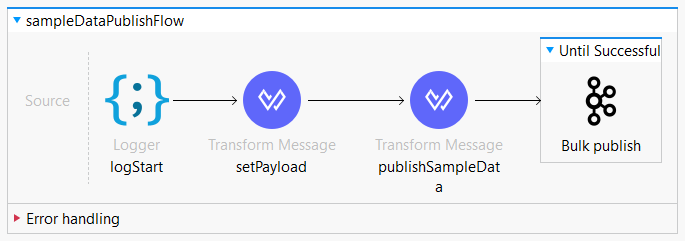
To ensure data conforms to defined schemas and to manage schema evolution effectively, integrate Confluent Schema Registry with the Kafka Connector. This can be achieved by setting additional properties in the Advanced Tab of the Kafka Connector configuration, available in Kafka Connector version 4.8.0 and later.
Steps to Run Kafka Producer
- Create a Kafka Producer configuration in Global Elements, naming it (e.g.,
Apache_Kafka_Producer_configuration), and configure it with a Producer SASL/PLAIN Connection using the bootstrap server URLs syntax$(kafka.url). Include necessary authentication details in the Security tab. - Test the connection to confirm it can successfully connect to the Kafka broker.
- Add the “Bulk Publish” component to your Mule flow after preparing the message. In its properties, select the previously created Kafka configuration, specify the target Kafka topic, optionally add a key, configure batch size, and set a timeout.
- Transform your messages to an appropriate format(JSON/Avro/Protobuf), as the Bulk Publish component requires data in batches.
- Add an Until Successful scope around the Bulk Publish component to implement retry logic for failed publishes, and configure error handling to manage potential publishing errors.
- Finally, deploy your application and use Kafka management tools to monitor the topic for published data.
Conclusion
Following these steps will enable you to successfully connect to a Kafka cluster and publish messages to the topic using the Kafka connector in MuleSoft.