Purpose and Scope of the Document
This document serves as a user guide for working with Flink in Confluent Cloud. It includes steps for users to understand, configure, and manage Flink environments, jobs, and related resources in Confluent Cloud. The objective is to provide a clear reference for accessing and using Flink’s capabilities in a standardized, secure, and efficient manner—ensuring smooth integration with existing data pipelines and workflows.
This guide helps users deploy, manage, and monitor Flink jobs effectively for both development and production use cases.
Flink Capabilities
- Stream & Batch Processing: Supports both real-time streaming and bounded snapshot batch jobs.
- Schema & Statement Evolution: Kafka tables are automatically mapped to Flink tables with schema metadata.
- Dependencies: External functions, tables, and snapshots are supported for advanced use cases.
- Monitoring & Metrics: The Confluent Cloud Console supports job status monitoring, resource tracking, and performance metrics. Navigate to Home → Environments → Flink → Your namespace-specific compute pool to view the Flink monitoring and metrics in the Confluent UI
Important Points to Consider While Requesting Access to Flink
- Each namespace will have its own compute pools in each environment, and Flink statements will run on Confluent resources within their respective environment-specific compute pools.
- For service accounts granted Flink access to run Flink statements programmatically, you will receive a set of API keys for the Flink resource scope.
- If you want to run DDL statements such as CREATE, DROP, or ALTER on tables, explicitly specify this in the ServiceNow request form.
- No user will be granted access to run DDL statements such as CREATE, DROP, or ALTER on tables in the prod environment via the UI. Instead, request Flink access for the production service account and the corresponding API keys to run Flink statements.
- In the prod environment, use only a service account to run DDL Flink statements such as CREATE, DROP, or ALTER on tables.
More information on:
- DDL statements overview
- Create Tables as Statement (CTAS)
- Drop Table as Statement (DTAS)
Steps to Use Flink in Confluent Cloud
Step 1: Access Flink
-
Playground users can access the dedicated Flink compute pool
pg-devusing the following link
and run Flink statements on the namespacekaas_pgin the Dev environment. -
For already onboarded users who have already onboarded to the KaaS platform, submit a ServiceNow request for access using this form
-
Newly onboarded teams will receive Flink access as part of their onboarding process if they specify it during onboarding. No further request is needed.
Step 2: Steps to Create and Run Flink SQL (via UI)
- Open the SQL workspace in Confluent Cloud.
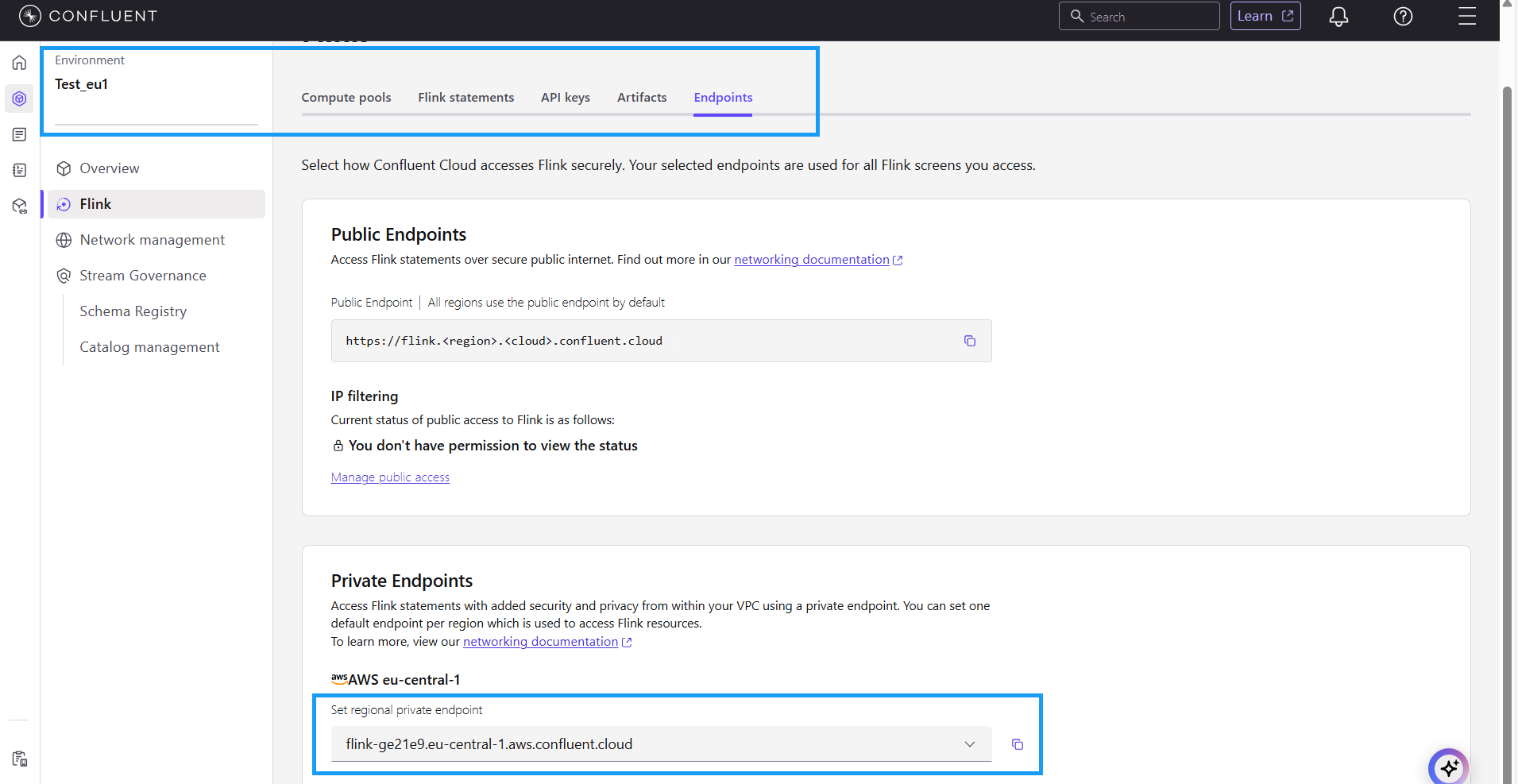
- [Mandatory step] Select the Flink endpoint as illustrated in the visual reference guide below when you want to run Flink statements on a private cluster.
- Create your Flink SQL queries.
- Execute the job and monitor its status from the Cloud Console.
Important Points to Consider While Requesting Access to Flink
- Each namespace will have its own compute pools in each environment, and Flink statements will run on Confluent resources within their respective environment-specific compute pools.
- For service accounts granted Flink access to run Flink statements programmatically, you will receive a set of API keys for the Flink resource scope.
- If you want to run DDL statements such as CREATE, DROP, or ALTER on tables, explicitly specify this in the ServiceNow request form.
- No user will be granted access to run DDL statements such as CREATE, DROP, or ALTER on tables in the prod environment via the UI. Instead, request Flink access for the production service account and the corresponding API keys to run Flink statements.
- In the prod environment, use only a service account to run DDL Flink statements such as CREATE, DROP, or ALTER on tables.
More information on:
- DDL statements overview
- Create Tables as Statement (CTAS)
- Drop Table as Statement (DTAS)
Visual Reference Guide