Purpose and scope of this Document
This document provides guidance for integrating the Kafka Connector in MuleSoft API, specifically for consuming data from a Kafka topic. The intended audience for this guide includes MuleSoft Architects and developers.
Pre-Reads for Kafka Implementation
- Apache Kafka Connector 4.10 Reference
- Confluent Schema Registry with Kafka Connector
- Redelivery Policy
- KaaS Naming Conventions
- Schema Evolution and Compatibility for Schema Registry
Prerequisites for Implementation on MAP
Before starting the implementation on MAP, ensure you have the following details for the Kafka Connector configuration: - Cluster API Key: Used to access a specific Kafka cluster. - Schema Registry Key: An API key specific to Schema Registry that is distinct from the API key for creating Kafka clusters. - Bootstrap Server URL: Tells your Kafka clients (producers and consumers) where to find the Kafka brokers. - Schema Registry URL: Tells clients where to find the Confluent Schema Registry. - Kafka Client Keystore JKS file: Contains the client's private key and certificate needed for TLS/SSL authentication and encryption.
Subscriber Flow
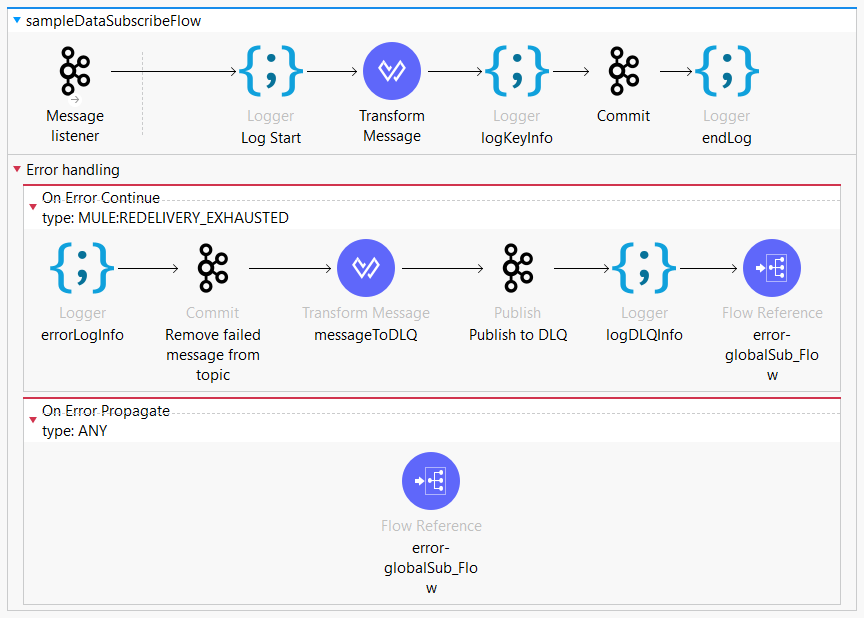
For the subscriber flow, we have used 2 operations:
- Message Listener: Consumes a single message from the cluster.
- Commit: Commits the offsets associated with a message or batch of messages consumed in a Message Listener. When a Message Listener or a Batch Message Listener uses the MANUAL acknowledgement mode, you must use a Commit operation at the end of the flow when the flow finishes successfully.
We also have Batch Message Listener, which consumes a list of messages from the Kafka Cluster.
Below are the consumer configuration parameters: - Set the consumer group ID in accordance naming convention. - Additional parameters for Kafka Schema Registry operations can be set as required.
Note: In the POM file of the Mule app, configure the Kafka Avro dependency containing the class to use for serialization and deserialization. You must update the
Also, one of the important parameters is the offset in consumer config. This integer number is used by Kafka to maintain the current position of a consumer, ensuring the consumer does not receive the same record twice. - Set Earliest if you want to re-read all messages from the beginning, or set Latest to receive the most recent message (the default).
Steps to Run Kafka Consumer
- Create a Kafka Consumer configuration in Global Elements, naming it (e.g.,
Apache_Kafka_Consumer_configuration), and configure it with a Consumer SASL/PLAIN Connection using the bootstrap server URLs syntax$(kafka.url). Include necessary authentication details in the Security tab. - Test the connection to confirm it can successfully connect to the Kafka broker.
- Add the “Message Listener” component to your Mule flow to consume messages from the specified Kafka topic. In its properties, select the previously created Kafka configuration, specify the target Kafka topic, and set acknowledgment mode.
- Optionally, add a Batch Message Listener component if you want to consume a batch of messages.
- Configure error handling for the Message Listener to handle any potential message consumption errors.
- Finally, deploy your application and use Kafka management tools to monitor the topic for consumed messages.
Basic Exception Handling for Subscriber Flow
- You can enable redelivery policy on the Message Listener connector.
- With the redelivery policy, Mule evaluates the received data before executing the flow components.
- If message delivery fails a specified number of times, the redelivery policy:
- Prevents further processing of the received data.
- Raises a
REDELIVERY_EXHAUSTEDerror.
- To collect failed messages, you can create a Dead Letter Queue (DLQ):
- This mechanism handles messages that fail to process in a Kafka-based messaging system.
- Ensures no data is lost and allows for reprocessing or analysis of failed messages for continuous improvement.
- You can also commit the offset of errored messages so that they are not processed again.
Conclusion
Following these steps will enable you to successfully connect to a Kafka cluster and consume messages from a Kafka topic using the Kafka connector in MuleSoft.