KaaS OAuth Setup Guide
Overview
This guide describes the prerequisite steps required before you can request an identity pool for OAuth-based authentication with Kafka clients on the KaaS platform. Identity pools provide an alternative to service account-based authentication by allowing Azure AD applications to authenticate directly using OAuth tokens.
Prerequisites
Before you can request an identity pool, you must complete the following prerequisite steps:
1. Create an Enterprise App Registration
You need to have an enterprise app registration in Azure AD that will serve as the identity for your Kafka client.
-
Navigate to the ServiceNow Create new EntraID App Registration request form, under IT Services > Accounts and Access > Single Sign On
-
Fill out the required information for your application:
- Name: Provide an identifying name for your team, KaaS namespace, and Kafka Client
- Environment type: Select a fitting environment type (used as a postfix for your display name)
- This can be changed afterwards on Azure Portal if needed
- Note: You do not need to match KaaS environment names exactly; structure app registrations based on your requirements
- Description: App registration to authenticate a Kafka Client via OAuth to the KaaS platform for the
<XYZ>namespace/team - SME name & Additional Owners: Use your own initials (you will need to be the owner for next steps; you can re-delegate ownership later)
- Create Enterprise App: Select Yes
-
Submit the request
Note: This request is processed automatically within 15 minutes
ServiceNow Form Link: Single Sign On - Create new EntraID App Registration
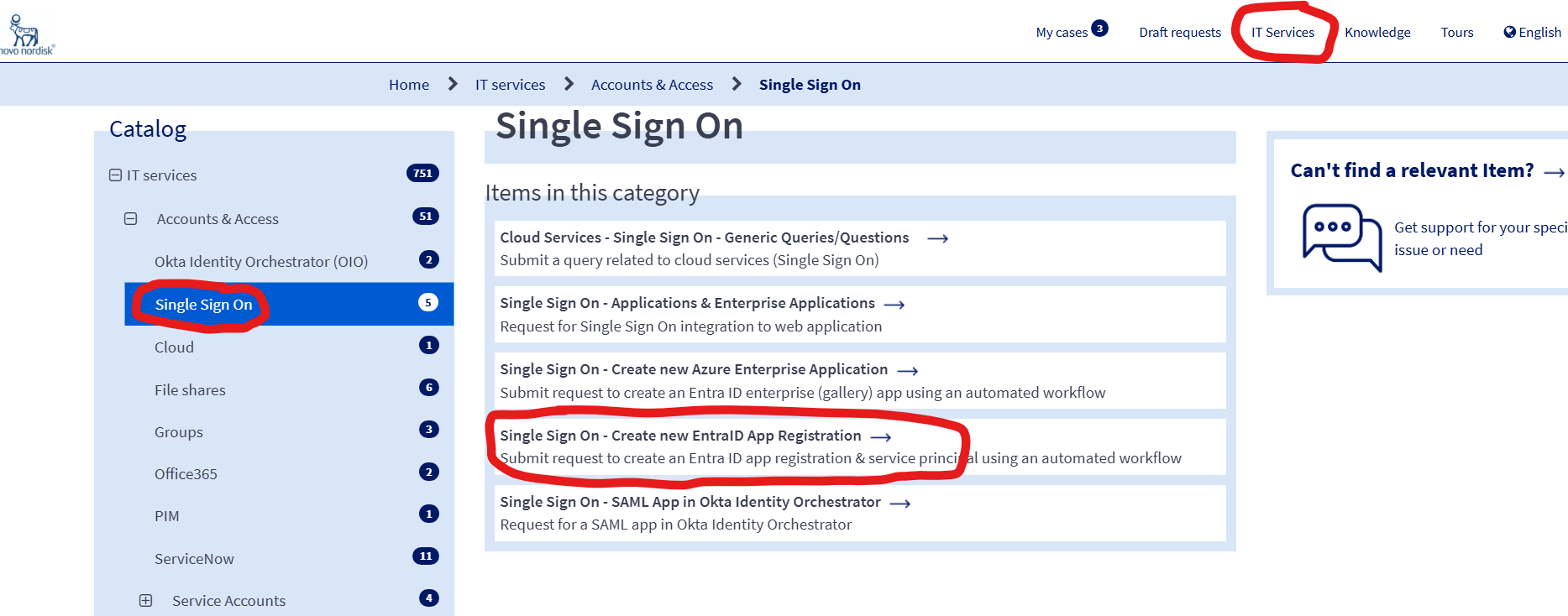
2. Upgrade your app registration Manifest to use OAuth V2 tokens
Once your enterprise app registration is created, you need to update its manifest so it uses OAuth V2 tokens.
- Navigate to the Azure Portal from the user you specified as SME / Additional Owner for the app registration in Step 1
- Go to Azure Active Directory > App registrations - Link: portal.azure.com
- Navigate to Your app registration → Manifest
- Preferred (Microsoft Graph manifest): set
1
2
3
"api": { "requestedAccessTokenVersion": 2 } - If your manifest instead shows the legacy property (older/AAD Graph-style): set
1"accessTokenAcceptedVersion": 2 - Save the manifest.
Notes
- Edit the property that exists in your manifest; you typically won’t need to add both.
- Setting the value to 2 switches your app to use OAuth v2 tokens.
3. Configure API Permissions and Get Approval
Once your enterprise app registration is created, you need to configure it to access the KaaS OAuth API and get the necessary approvals.
Step 3.1: Request API Permissions in Azure Portal
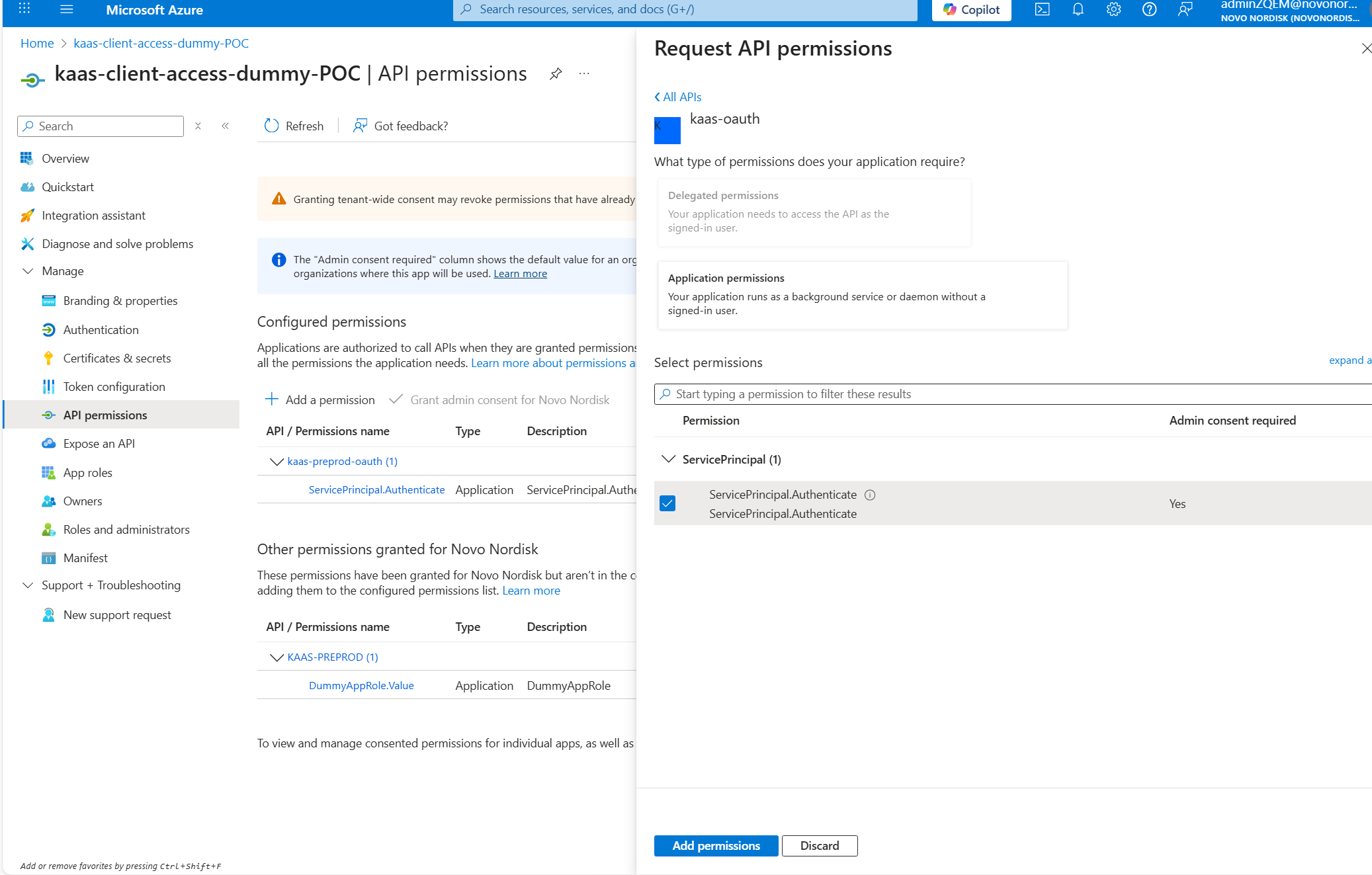
You need to request access to the ServicePrincipal.Authenticate role defined by the kaas-oauth resource app API.
-
Navigate to the Azure Portal from the user you specified as SME / Additional Owner for the app registration in Step 1
-
Go to Azure Active Directory > App registrations
- Link: portal.azure.com
-
Find and select your newly created app registration
-
In the left menu, click on API permissions
-
Click Add a permission
-
Select APIs my organization uses
-
Search for and select
kaas-oauth -
Select Application permissions
-
Check the box for
ServicePrincipal.Authenticate -
Click Add permissions
Step 3.2: Request Admin Approval via ServiceNow
After adding the API permissions in Azure Portal, you need to request approval from an Azure AD admin through ServiceNow.
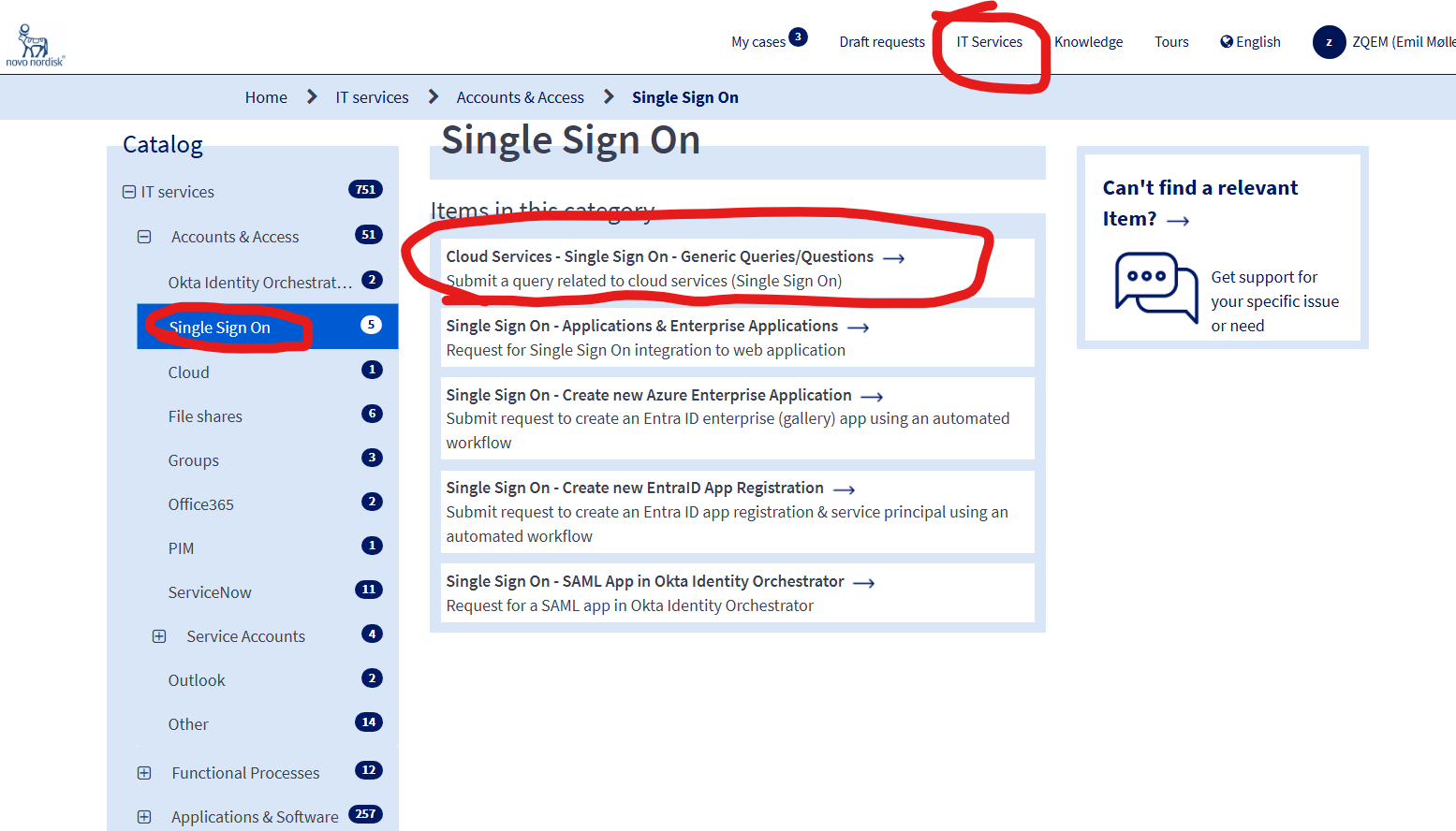
A screenshot with most of the same example answers provided in the text here is included below, but please note: insert your OWN app registration name in the relevant field, and your own admin account credentials! For all other fields than Specify Admin account name (Admin Owner) and Entra registered Application name, you can paste our provided answers.
-
Navigate to the ServiceNow Cloud Services - Single Sign On - Generic Queries/Questions request form under IT Services > Accounts and Access > Single Sign On
-
Fill out the following information:
- Identity Providers: Microsoft Entra ID
- Services: API permission grant
- Do you have an admin account?: Yes (if not, create one and return)
- Do you need administrative consent?: Yes
- Entra registered Application Name: INSERT name of your app registration created in step 1
- Request API Permission: Other Custom API
- Type of Api Permission Details: Application
- API Permission Detail which needs to be configured for application:
- API name:
kaas-oauth - Permission/role name:
ServicePrincipal.Authenticate
- API name:
- Justification: We use OAuth using Azure Entra ID for the Kafka as a Service (KaaS) platform, and our model requires client applications getting API permission to a KaaS OAuth application role, to satisfy the minimum required token claims for our system
-
Submit the request
ServiceNow Form Link: Cloud Services - Single Sign On - Generic Queries/Questions
Key points to convey:
- You need approval for the ServicePrincipal.Authenticate role from the kaas-oauth resource app
- This is required for OAuth-based authentication with KaaS Kafka clusters
- Include your enterprise app registration name and ID
- Provide brief description of use case (use the one supplied by us)
Next Steps
Once you have completed the prerequisite steps:
1. ✅ Created an enterprise app registration (automatically approved within 15 minutes)
2. ✅ Updated your app registration to use OAuth V2 tokens
3. ✅ Requested and received approval for ServicePrincipal.Authenticate role access
You can then proceed to request an identity pool for your Kafka clients through the standard KaaS platform request process.
Key points
- All identity pools require the
kafka-oauthapp registration as an audience/scope - We use OAuth v2 tokens
- The
ServicePrincipal.Authenticaterole grant from thekafka-oauthresource app is mandatory for all identity pools
Resources
Next Steps
Once you have completed all prerequisite steps and created your identity pool, you can configure OAuth authentication for your Kafka clients:
For MuleSoft-based Integrations
If you're using MuleSoft for Kafka integration: - OAuth Setup in MuleSoft - Configure producers and consumers in MuleSoft Studio with OAuth authentication, including visual configuration references and property reference tables
For Native Kafka Client Applications
If you're implementing OAuth in a native Kafka client application (Go, Python, C#, Java, Node.js, etc.): - Using OAuth from your Kafka Clients - Comprehensive guide with configuration parameters, code examples from confluent-kafka-go, and details on secretless federated credentials